
Daily Rewards System
Complete daily rewards system for Roblox games with streak tracking, multiple reward types, and DataStore persistence.
 Purchase the System (15 Euro)
Description
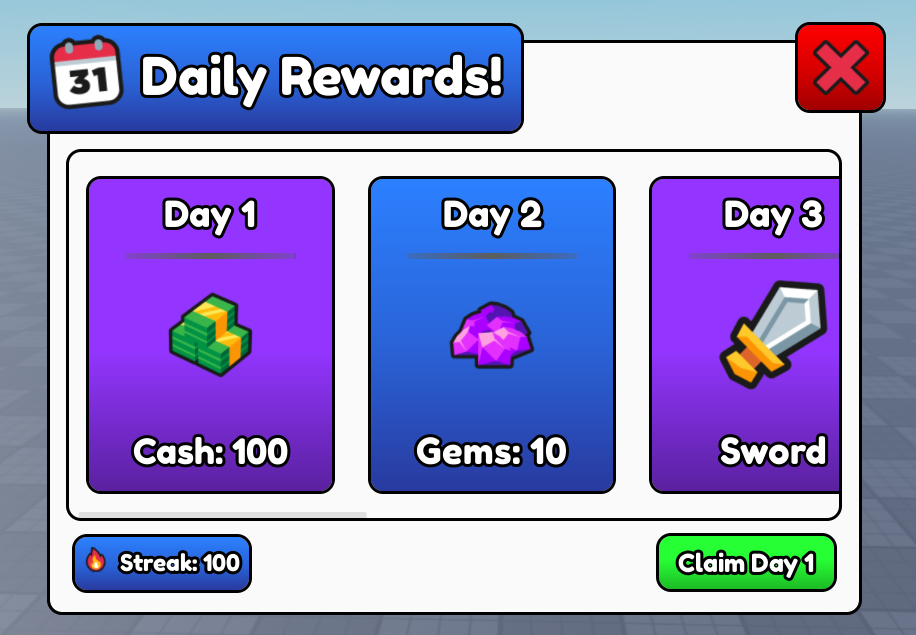
A fully-featured daily rewards system that allows players to claim rewards each day, maintaining a 7-day streak cycle. The system includes DataStore integration for persistent data, custom UI support, and three reward types: currency, items, and custom callbacks.
Features
- 7-day streak system with automatic reset
- DataStore integration with Studio mode support
- Full Documentation | Beginner Friendly
- Three reward types: Currency, Items, and Custom
- Pre-built UI with customizable templates
- Streak tracking and visualization
- Configurable rewards per day
- Optional streak enforcement
- Automatic UI display on player join
Installation
Step 1: Setup Structure
Place the system modules in your game hierarchy:
ServerScriptService
  └── DailyRewardsSystem (ModuleScript)
      └── Types (ModuleScript)

ReplicatedStorage
  └── DailyRewardsRemotes (Folder)
      ├── OpenUI (RemoteEvent)
      ├── ClaimReward (RemoteFunction)
      ├── GetUserData (RemoteFunction)
      └── GetDailyRewardsInfo (RemoteFunction)
  └── DailyRewardsItems (Folder)
      └── [Your reward items here]
  └── DailyRewardsImages (Folder)
      └── [ImageLabels for rewards]

StarterGui
  └── DailyRewardsUI (ScreenGui)

StarterPlayerScripts
  └── DailyRewardsClient (LocalScript)
Step 2: Initialize the System
In a server script, initialize the Daily Rewards System:
local ServerScriptService = game:GetService("ServerScriptService")
local DailyRewardsSystem = require(ServerScriptService.DailyRewardsSystem)

DailyRewardsSystem:Init()
Configuration
Settings Overview
Edit the SETTINGS table in the DailyRewardsSystem module:
local SETTINGS = {
    ShowUIOnJoin = true,              -- Show UI when player joins
    SaveInStudio = true,              -- Enable saving in Studio
    SeparateDatabaseInStudio = true,  -- Use separate DataStore in Studio
    StreakEnabled = true,             -- Require consecutive daily logins
    Items = ReplicatedStorage.DailyRewardsItems,
    RemotesFolder = ReplicatedStorage.DailyRewardsRemotes,
    Rewards = {
        -- Configure rewards here (see below)
    }
}| Setting | Type | Description |
|---|---|---|
ShowUIOnJoin |
boolean | Automatically show the UI when players join |
SaveInStudio |
boolean | Enable DataStore saving in Studio mode |
SeparateDatabaseInStudio |
boolean | Use a separate DataStore for Studio testing |
StreakEnabled |
boolean | Require consecutive daily logins for streaks |
Items |
Folder | Folder containing reward items (Tools) |
RemotesFolder |
Folder | Folder containing RemoteEvents/Functions |
Reward Types
1. Currency Rewards
Give in-game currency stored in leaderstats or custom folders:
Rewards = {
    [1] = {
        RewardType = "GiveCurrency",
        Amount = 100,
        CurrencyName = "Cash",
        -- Optional: specify parent folder
        CurrencyParent = "leaderstats"  -- Default: "leaderstats"
    }
}
The system searches for a NumberValue/IntValue in Player.leaderstats (or custom parent) with the specified CurrencyName.
2. Item Rewards
Give tools or items from your Items folder:
Rewards = {
    [2] = {
        RewardType = "GiveItem",
        ItemName = "Sword",
        Quantity = 1
    }
}
Items are cloned from SETTINGS.Items folder and placed in the player's Backpack.
3. Custom Rewards
Execute custom code when a reward is claimed:
Rewards = {
    [3] = {
        RewardType = "Custom",
        CustomData = {
            PowerUpName = "SpeedBoost",
            Duration = 60
        },
        Callback = function(Player, CustomData)
            -- Your custom reward logic
            print("Giving", CustomData.PowerUpName, "to", Player.Name)

            -- Return true for success, false for failure
            return true
        end
    }
}
The callback receives the Player and CustomData table. Return true for success or false if the reward fails.
Complete Example Configuration
Rewards = {
    [1] = {
        RewardType = "GiveCurrency",
        Amount = 100,
        CurrencyName = "Cash"
    },
    [2] = {
        RewardType = "GiveItem",
        ItemName = "Sword",
        Quantity = 1
    },
    [3] = {
        RewardType = "GiveCurrency",
        Amount = 10,
        CurrencyName = "Gems"
    },
    [4] = {
        RewardType = "GiveCurrency",
        Amount = 200,
        CurrencyName = "Cash"
    },
    [5] = {
        RewardType = "GiveItem",
        ItemName = "Magic Carpet",
        Quantity = 1
    },
    [6] = {
        RewardType = "Custom",
        CustomData = { XPBoost = 2.0, Duration = 3600 },
        Callback = function(Player, Data)
            -- Apply XP boost
            return true
        end
    },
    [7] = {
        RewardType = "GiveItem",
        ItemName = "Speed Coil",
        Quantity = 1
    }
}
API Reference
DailyRewardsSystem:Init()
Initializes the system, connects events, and sets up RemoteFunctions.
-- Server
local DailyRewardsSystem = require(ServerScriptService.DailyRewardsSystem)
DailyRewardsSystem:Init()
DailyRewardsSystem:GetDailyRewardsData(Player)
Returns the player's daily rewards data from DataStore.
-- Server
local data = DailyRewardsSystem:GetDailyRewardsData(player)
-- Returns: { StreakStart = number, LastClaim = number? }
DailyRewardsSystem:CanClaimDailyStreak(Player)
Checks if the player can claim their daily reward.
-- Server
local canClaim = DailyRewardsSystem:CanClaimDailyStreak(player)
-- Returns: boolean
DailyRewardsSystem:GetPlayerStreak(Player)
Returns the player's current streak day (1-7).
-- Server
local streakDay = DailyRewardsSystem:GetPlayerStreak(player)
-- Returns: number (1-7)
DailyRewardsSystem:ClaimDailyReward(Player)
Processes a reward claim for the player.
-- Server
local success, reward, day = DailyRewardsSystem:ClaimDailyReward(player)

if success then
    print("Claimed day", day, "reward!")
else
    warn("Claim failed:", reward)  -- reward contains error message
end
DailyRewardsSystem:GetRewardsConfiguration()
Returns the complete rewards configuration table.
-- Server
local rewards = DailyRewardsSystem:GetRewardsConfiguration()
-- Returns: {[number]: Reward}
Client-Side Usage
Opening the UI Manually
Fire the OpenUI remote event from a client script:
-- Client
local ReplicatedStorage = game:GetService("ReplicatedStorage")
local Remotes = ReplicatedStorage:WaitForChild("DailyRewardsRemotes")

-- Open the daily rewards UI
Remotes.OpenUI:FireServer()
Getting User Data
Retrieve the player's current streak information:
-- Client
local userData = Remotes.GetUserData:InvokeServer()

print("Current Streak Day:", userData.Streak)
print("Day to Claim:", userData.ToClaimDay)
print("Can Claim:", userData.CanClaim)
Claiming Rewards
Process a reward claim from the client:
-- Client
local success, reward, day = Remotes.ClaimReward:InvokeServer()

if success then
    print("Successfully claimed day", day, "reward!")
    -- Refresh UI
else
    warn("Failed to claim:", reward)
end
How It Works
Streak System
The system tracks player streaks over a 7-day cycle:
- Day 1-7: Players claim rewards in sequence
- After Day 7: The cycle restarts at Day 1
- Missed Days: If
StreakEnabled = true, missing a day resets the streak to Day 1 - Same Day: Players cannot claim more than once per day
Data Structure
Player data is stored with the following structure:
{
    StreakStart = number,  -- Day number when streak started
    LastClaim = number?    -- Day number of last claim (nil if never claimed)
}

-- Day number = math.floor(os.time() / 86400)
DataStore Keys
Data is saved using the following naming convention:
-- Production DataStore
DatabaseID = "DailyRewards"
Key = "ID-" .. player.UserId

-- Studio DataStore (when SeparateDatabaseInStudio = true)
DatabaseID = "StudioDailyRewards"
Key = "ID-" .. player.UserIdCustomization
Custom UI
The system includes a pre-built UI, but you can customize it:
- Edit
StarterGui.DailyRewardsUIto change the appearance - The client script expects:
Main.Content,Main.Footer,Main.CloseButton - Reward templates are cloned from
LocalScript.RewardTemplate - Icons are loaded from
ReplicatedStorage.DailyRewardsImages
Custom Currency Parents
By default, the system looks for currency in Player.leaderstats. To use a different folder:
Rewards = {
    [1] = {
        RewardType = "GiveCurrency",
        Amount = 50,
        CurrencyName = "Tokens",
        CurrencyParent = "PlayerData"  -- Searches Player.PlayerData.Tokens
    }
}
Disabling Streak Enforcement
Allow players to claim rewards without consecutive logins:
local SETTINGS = {
    StreakEnabled = false,  -- Players can claim anytime
    -- ... other settings
}
When disabled, players can claim the next reward whenever they want, without losing progress.
Troubleshooting
Rewards Not Giving
Check the following:
- For currency: Ensure the value exists in
Player.leaderstats - For items: Verify items exist in
SETTINGS.Itemsfolder - For custom: Check that the callback returns
true - Enable debug prints in
Typesmodule:local DebugPrints = true
UI Not Showing
Verify the following:
ShowUIOnJoin = truein settings- All RemoteEvents/Functions exist in
RemotesFolder - UI elements are properly named in StarterGui
- Client script is in StarterPlayerScripts
Data Not Saving
Common causes:
- DataStore API is disabled in Studio settings
SaveInStudio = false(data is stored temporarily)- DataStore write limits reached (1 write per 6 seconds per key)
- Player left before data could save